Set chmod file and directory permissions with FileZilla
by Sanju[ Edit ] 2009-08-12 11:32:27
Set chmod file and directory permissions with FileZilla
chmod is a Unix and Linux command to set file permissions. Permission are set to control access to files and directories.

If you need to set permissions for a file or directory, you probably are following instructions that tell you which permissions need to be set.
   1. Open the connection to your web site

   2. Find the file or directory that you want to change permissions for in the window on the right side of FileZilla

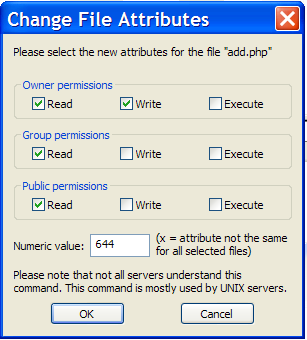
   3. Right click on the file or directory and select "File attributes …"

   4. Click on the appropriate boxes to change the permissions